
How Do You Choose After-Hours Call Centre Coverage?
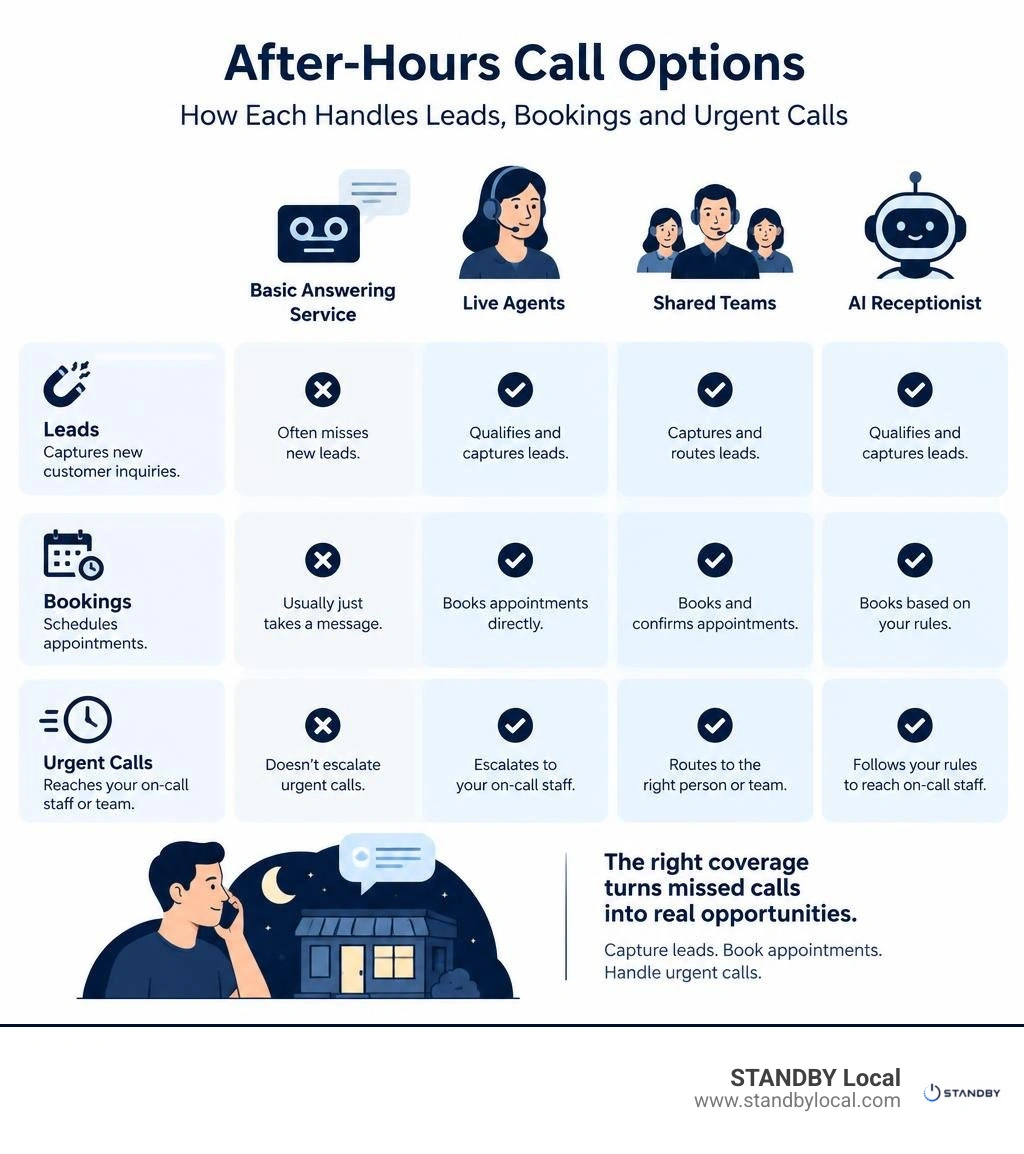
An after-hours call centre handles calls when your business is closed. To choose one, check whether it can capture leads, book appointments, and reach your on-call staff for urgent jobs. A basic answering service may only take messages; live agents, shared teams, and AI receptionists can do more, but only when their rules match how your business works.
For a local service business, start with the calls you miss today. Are they new jobs, routine questions, or emergencies? That answer will help you compare coverage options without paying for more than you need.
I’m Drew Edmondson, founder of Charlottesville-based STANDBY Local. My work with AI receptionists and workflow automation helps local businesses identify where an after hours call centre could ease pressure and where a simpler fix may do.
A useful starting point is a simple call map. List the kinds of calls that arrive after closing, the information a caller needs, and the staff member who can resolve each issue. Then decide which calls can be answered, booked, or documented immediately and which must be escalated. This gives a provider or an AI receptionist clear instructions and keeps the service focused on the work that actually protects customer relationships and your team’s time.
Keep the instructions in one place and assign someone to review them whenever services, hours, or on-call staff change. Even a well-designed call flow loses value when it reflects an outdated schedule or no longer matches what the business can deliver.
What Is an After Hours Call Centre and How Does It Operate?
When your office lights go out for the day, your phone line does not stop ringing. An after-hours call center serves as an extension of your front office during nights, weekends, and holidays. Rather than dumping callers into a generic voicemail inbox where revenue goes to die, these solutions step in to greet callers, qualify their intent, and take decisive action.
Understanding this dynamic begins by reviewing your call volume patterns. In our missed call study, we found that unreturned after-hours inquiries frequently cost service businesses significant revenue because customers simply move down their search results until someone answers.

Core Functions of Answering Services vs. Contact Centers
A traditional answering service focuses primarily on taking basic messages and emailing them to your staff for the next morning. While helpful, this passive approach often creates friction for callers needing immediate resolution.
In contrast, a modern call center model actively resolves problems. It handles live booking directly inside your calendar, updates customer records, and provides callers with accurate operational information. When an urgent issue arises, it triggers immediate dispatch instead of letting critical tickets sit overnight. Many setups also support an omnichannel handoff, so a caller who starts on the phone can finish booking by text without repeating themselves.
Why Does Rapid Overnight Lead Capture Matter?
When a homeowner experiences a burst pipe or a client needs urgent legal assistance on a Sunday, they rarely wait for a callback the following morning. Prompt engagement directly preserves your marketing spend.
According to customer communication benchmarks from the U.S. Small Business Administration, responsive intake practices significantly improve client retention and build long-term business credibility. Deploying consistent response mechanisms ensures that high-value opportunities turn into booked jobs on your calendar rather than lost sales. The speed of your first response often matters as much as the quality of the work you eventually deliver, since a caller who reaches a competitor first rarely circles back.
The right setup should reflect what happens after a call is captured. For example, a routine request may only need a clear message and a promised follow-up during business hours, while a time-sensitive job may need an appointment slot or a notification to the on-call person. Documenting those paths before coverage begins makes scripts more accurate and reduces the chance that a caller receives a vague answer.
It is also important to decide what agents or automated systems should not do. They should not diagnose a technical problem, promise a specific arrival time that has not been confirmed, or improvise around pricing and availability. Clear boundaries let the service give helpful information while reserving judgment calls for the people who know the business. That balance is especially valuable for small service teams, where one confusing message can create extra work the next morning.
As you review providers, ask how they record caller details, how quickly staff can see those notes, and what happens when the first contact cannot be reached. The answers reveal whether the coverage is truly part of the front-office process or just a separate inbox that someone must sort through later.
Staff should also know what a completed after-hours record looks like. A useful record includes the caller’s contact details, the reason for the call, any promised next step, and the person responsible for that step. When everyone can see the same information, the morning handoff becomes faster and customer follow-up is less likely to depend on memory. This is a simple operational detail, but it helps the coverage process feel consistent whether the call is handled by a live agent, a shared team, or an automated receptionist.
How Do Live Agents and AI Support Models Compare?
Deciding how to staff overnight coverage comes down to balancing human touch, response speed, and operational overhead.
| Feature | Live Dedicated Agents | Shared-Pool Agents | AI Receptionist |
|---|---|---|---|
| Primary Strength | Deep brand familiarity | Cost sharing across accounts | Instant response, zero wait times |
| Response Latency | Low to moderate | Varies with queue spikes | Immediate for routine calls |
| Lead Capture | High | Moderate | High (direct CRM entry) |
| Scalability | Requires adding headcount | Limited by pool sizing | Infinite concurrent capacity |
| Best Used For | Complex, high-touch sales | Low-volume basic messaging | Around-the-clock booking & routine inquiries |

How Do Live Agents Compare With AI in an After Hours Call Centre?
Live human agents excel in sensitive, highly emotional conversations where nuanced empathy is critical. However, human teams face capacity bottlenecks during sudden call spikes and require continuous training across shifting operational protocols.
Modern automated solutions bridge this gap effectively. By implementing an AI receptionist, local service companies can handle routine inquiries, collect caller details, and process scheduling requests instantly. Bounded rules ensure that routine questions are resolved automatically, while complex emergencies escalate directly to human technicians.
How Do Shared-Pool and Dedicated Agent Teams Differ?
Shared-pool models spread call operators across many unrelated companies. While economical for low call volumes, operators juggle multiple scripts, which can lead to mispronunciations or inconsistent data collection. Dedicated agent teams provide consistent brand alignment and deeper service knowledge, though they require higher baseline financial commitments.
The best model depends on the calls that come in, not on a general claim that one option is always better. A dedicated team may make sense when the service menu is complex, the brand voice is especially important, or callers often need detailed context. A shared team can suit a business that mainly needs reliable message capture. An AI receptionist can be a practical fit when common questions, appointment requests, and routing decisions follow clear rules.
Many local businesses use a blended approach. Automation can collect the basics and handle routine scheduling at any hour, while a trained person receives exceptions that need judgment or reassurance. Before choosing that structure, review a representative week of missed and after-hours calls. Look for repeat questions, recurring emergency triggers, and moments when callers need a handoff. Those patterns will show where automation saves time and where human involvement adds real value.
Build the script around the information staff need next, then keep it short enough for a caller to answer comfortably. Review recorded outcomes regularly and update any question that produces incomplete details, confused callers, or unnecessary transfers.
How Do Escalation Protocols and Systems Integrate After Hours?
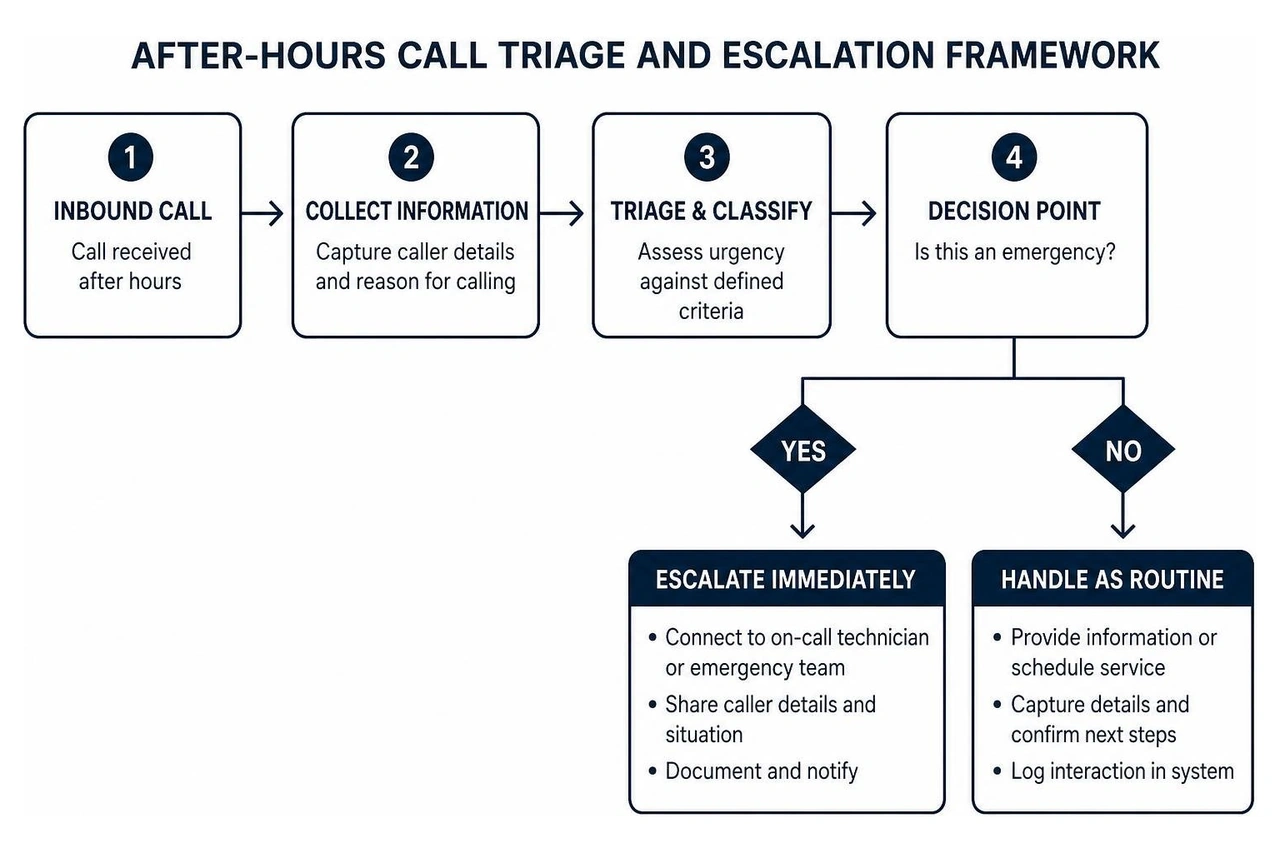
Handling after-hours calls effectively requires clear operational logic. Every inbound interaction should follow a structured sequence to determine whether the call represents routine information gathering or a genuine emergency.
How Should Emergency Triage Protocols Work in an After Hours Call Centre?
Your operational safety net depends on clear triage rules. When setting up protocols, define explicit triggers for what constitutes an emergency:
- Urgency Classification: Operators or automated systems assess caller input against specific criteria (such as active flooding, electrical hazards, or system outages).
- Immediate Notification: Confirmed emergencies trigger sequential alerts across your on-call list via phone, SMS, and paging systems.
- Escalation Backup: If the primary technician fails to respond within a defined response window, the system automatically routes the ticket to secondary staff.
- Audit Logging: Every attempt, timestamp, and transcript is recorded to ensure complete operational accountability.
Guidance from the Federal Communications Commission emphasizes that clear telecommunication routing rules are vital for maintaining reliable emergency dispatch and public accessibility.
How Can CRMs and Field Software Be Integrated?
An after-hours system should not operate in an isolated silo. Modern implementations use secure webhooks and API connections to sync data across your existing software stack.
By pairing call handling with structured workflow automation, caller details flow directly into your CRM, appointments populate in real time, and instant confirmation texts reach the customer immediately without manual morning data entry.
Integration planning should begin with the records your staff already use. Decide which details must be captured on every call, such as the caller’s name, phone number, service address, request, and urgency. Then confirm where those details belong in the CRM or field-service system and who receives an alert when the call needs action. A consistent record prevents staff from having to re-enter notes or search across text messages, voicemail, and separate dashboards.
Test the workflow before relying on it overnight. Place sample calls for routine questions, appointment requests, and emergencies, then verify that the right information appears in the right place and reaches the correct person. Review what happens when a calendar is full, an on-call technician does not respond, or a caller provides incomplete information. Testing those exceptions is often where unclear routing rules become visible.
Access controls also matter. Limit integration permissions to the data needed for call handling, keep scripts and contact lists current, and establish a clear owner for reviewing changes. These basic operating habits help the system stay dependable as staffing, hours, and service offerings change.
Assign a regular review date so outdated contact lists and routing rules do not remain in the system unnoticed.
What Cost Structures and Staffing Models Make Sense for Local Businesses?
Evaluating after-hours call coverage requires matching pricing mechanics to your historical call volume. Most services bill through either per-minute models, monthly flat-rate minute bundles, or per-user seat licenses. For details on how we structure our services and growth plans, check our transparent service pricing structures.
How Does an In-House Night Shift Compare With Outsourced Solutions?
Hiring internal staff for overnight shifts introduces significant payroll overhead, management strain, and employee turnover risks. Maintaining overnight and weekend internal coverage requires multiple full-time salaries, benefits, and overnight supervisory oversight.
For the vast majority of local service businesses in Central Virginia, relying on outsourced or automated intake systems eliminates overnight staffing friction while keeping operational overhead lean and predictable from month to month.
What Should You Look for in a Call Coverage Partner?
When evaluating after-hours support solutions, prioritize partners who provide:
- High operational uptime and system reliability
- Customized scripting that aligns with your specific brand tone
- Data-handling practices aligned with the NIST Privacy Framework
- Transparent call logs and recording reviews to evaluate communication quality
A good partner should also be willing to walk you through how calls are routed and escalated, rather than treating that process as a black box.
Cost comparisons are more useful when they start with the cost of the problem, not just the provider’s rate. Review how often calls are missed after hours, what staff time is spent returning them, and which requests genuinely require an immediate response. A lower monthly charge can be less valuable if the setup produces incomplete notes, sends the wrong alerts, or leaves customers waiting for clarification.
Ask prospective partners how their pricing changes when call volume rises, whether setup and script revisions are included, and what reporting is available. It is also reasonable to ask who listens to recordings, who can change the escalation list, and how quickly the service can adapt when business hours or staffing changes. Those answers make it easier to compare a simple message service with a more integrated intake process.
For many local businesses, the most practical option is the one that matches current demand and can be adjusted without rebuilding the entire workflow. Start with defined call types and escalation rules, then review the results after the first period of use. If routine calls are handled well but urgent calls still create delays, the workflow can be refined around that specific bottleneck rather than replaced wholesale.
The decision should be reviewed as operations change. New service lines, seasonal demand, and new staff can alter what callers need after hours. A provider that supports clear reporting and simple script updates gives the business room to adapt without losing visibility into the intake process.
Before choosing a provider, ask for a walkthrough of a typical after-hours call, from the caller's first question to the final handoff. Confirm who owns the script, how updates are approved, where call notes are stored, and how the on-call schedule is kept current. This review can reveal whether a service is built around your actual workflow or simply offers a generic message-taking process. It also gives managers a practical way to test whether the proposed coverage supports customers without creating avoidable follow-up work for staff.
How Can STANDBY Local Help?
At STANDBY Local, we take a diagnostic approach to local business growth. Instead of selling one-size-fits-all call packages, we analyze your intake bottlenecks to determine exactly where calls drop off. Whether your business in Charlottesville or Albemarle County needs automated call capture, streamlined scheduling, or an end-to-end digital growth system, we build dependable infrastructure tailored to your workflow.
Before recommending any specific fix, we look at your current call patterns, website performance, and booking process together, because an after-hours call centre only helps if the rest of your intake system supports it. If you want a second set of eyes on where your business is losing calls, a free 15-minute consultation is a low-pressure way to start.
The goal is not to add technology for its own sake. We start by tracing what happens from the moment a customer calls to the moment the right person follows up. That can show whether the real problem is missed calls, unclear routing, a slow booking process, or a gap between the website and the team handling new inquiries. From there, STANDBY Local can recommend an AI receptionist, workflow automation, local SEO support, or a simpler operational change that fits the business.
That approach keeps the recommendation tied to the business’s actual capacity, customer expectations, and next practical step.
Frequently Asked Questions
How do operators distinguish between true emergencies and routine messages?
Calls are filtered through a predefined urgency matrix. The system evaluates caller responses against specific operational triggers (like system failures or property damage) to separate true emergencies from standard messages.
Can an after-hours service schedule appointments directly into internal calendars?
Yes. Modern systems connect with your existing booking software, applying your predefined scheduling rules, buffer times, and technician availability to book real-time appointments.
What should a business prepare before starting after-hours coverage?
Prepare current business hours, service areas, common caller questions, booking rules, emergency triggers, and an up-to-date on-call contact list. A short review of recent missed calls can also help identify which situations need immediate action and which can wait for normal business hours.
It also helps to decide in advance who can approve script changes, who receives urgent notifications, and how missed follow-ups will be reviewed. The more clearly those responsibilities are assigned, the easier it is to keep coverage reliable as the business grows or the on-call schedule changes.
Review these materials with the person responsible for answering calls before service begins and whenever the schedule changes.
Ready to capture more leads and protect your time after hours? Schedule a free 15-minute consultation with us today.