
How Do You Bring Website Inquiries and Phone Calls Into One Lead Tracking Dashboard?
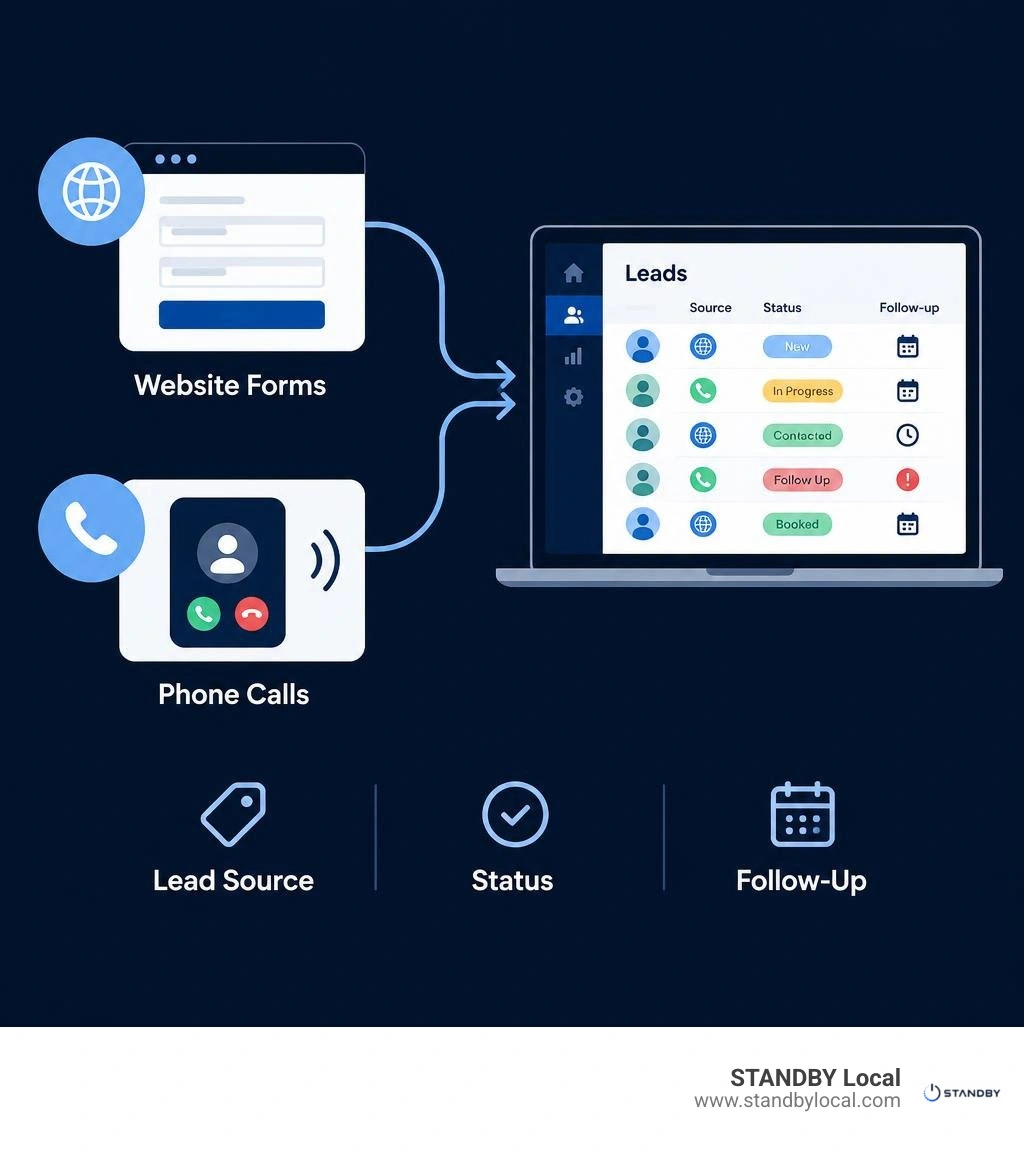
To track website inquiries and phone calls in one place, send form submissions and call logs into the same lead tracking dashboard. Match records to contacts where possible, label each lead's source and status, and flag the ones that need a reply.
For a local service business, the first step is finding the gap: missed calls, forms buried in an inbox, or leads with no one assigned to follow up. A shared view of new inquiries, response times, and booked jobs makes those gaps easier to see. We reviewed our own blog and guide pages before writing this piece, and this is the first time we've walked through the full setup for connecting calls and web forms into one dashboard.
I'm Drew Edmondson, founder of STANDBY Local in Charlottesville. My work with websites, AI receptionists, and workflow automation for small businesses has taught me to build a lead tracking dashboard around the follow-up problem it needs to solve.
What Is a Centralized Lead Tracking Dashboard for Local Businesses?
A centralized lead tracking dashboard unifies customer inquiries—form fills, calls, texts, and chat—into one feed. Instead of checking multiple inboxes and voicemail apps, business owners see all prospect activity in one workspace. This structure aligns with operational standards from the U.S. Small Business Administration for managing small business operations efficiently.
| Feature / Method | Manual Spreadsheets & Sticky Notes | Centralized Lead Dashboard |
|---|---|---|
| Data Ingestion | Manual copy-pasting | Automated via webhooks and call feeds |
| Response Speed | Delayed (hours or days) | Immediate alerts with instant status visibility |
| Source Tracking | Guesswork and manual notes | Exact attribution (SEO, Google Ads, Meta Ads) |
| Follow-Up Oversight | High risk of forgotten prospects | Color-coded status stages and task reminders |
How Do Disconnected Lead Channels Cost Local Companies Revenue?
Channel fragmentation creates operational blind spots. When website submissions land in an inbox while calls ring a technician's mobile device, inquiries get lost. According to our missed call data and phone response patterns, unreturned calls and slow responses drive potential clients straight to competitors who answer immediately.
Which Core Metrics Should You Monitor on a Lead Tracking Dashboard?
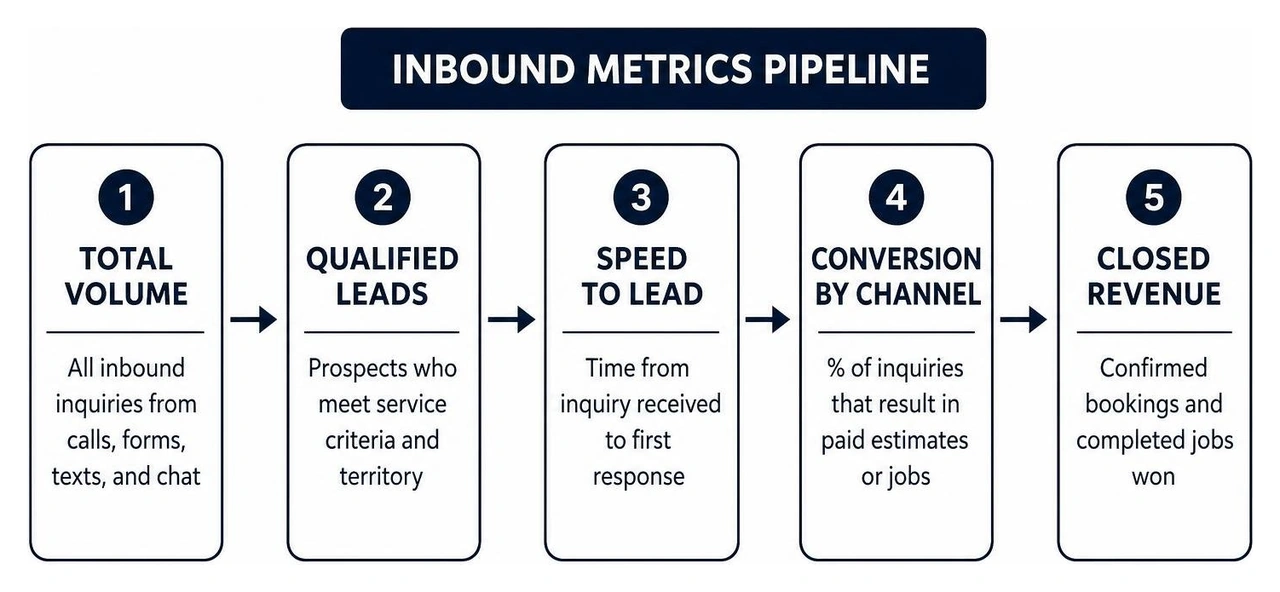
Your dashboard should track actionable metrics that diagnose operational bottlenecks:
- Total Inbound Volume: Raw count of incoming phone calls, web submissions, and chat messages.
- Qualified Leads: Prospects who meet your service criteria and service area.
- Cost Per Acquisition: Total marketing spend across ad channels divided by confirmed bookings.
- Speed to Lead: Elapsed time between an inquiry arriving and your team's first response.
- Conversion Rate by Channel: Percentage of calls versus form submissions resulting in paid jobs.
- Pipeline Velocity: Average days from first contact to a completed estimate.
How Do You Connect Website Forms and Phone Calls into One Stream?
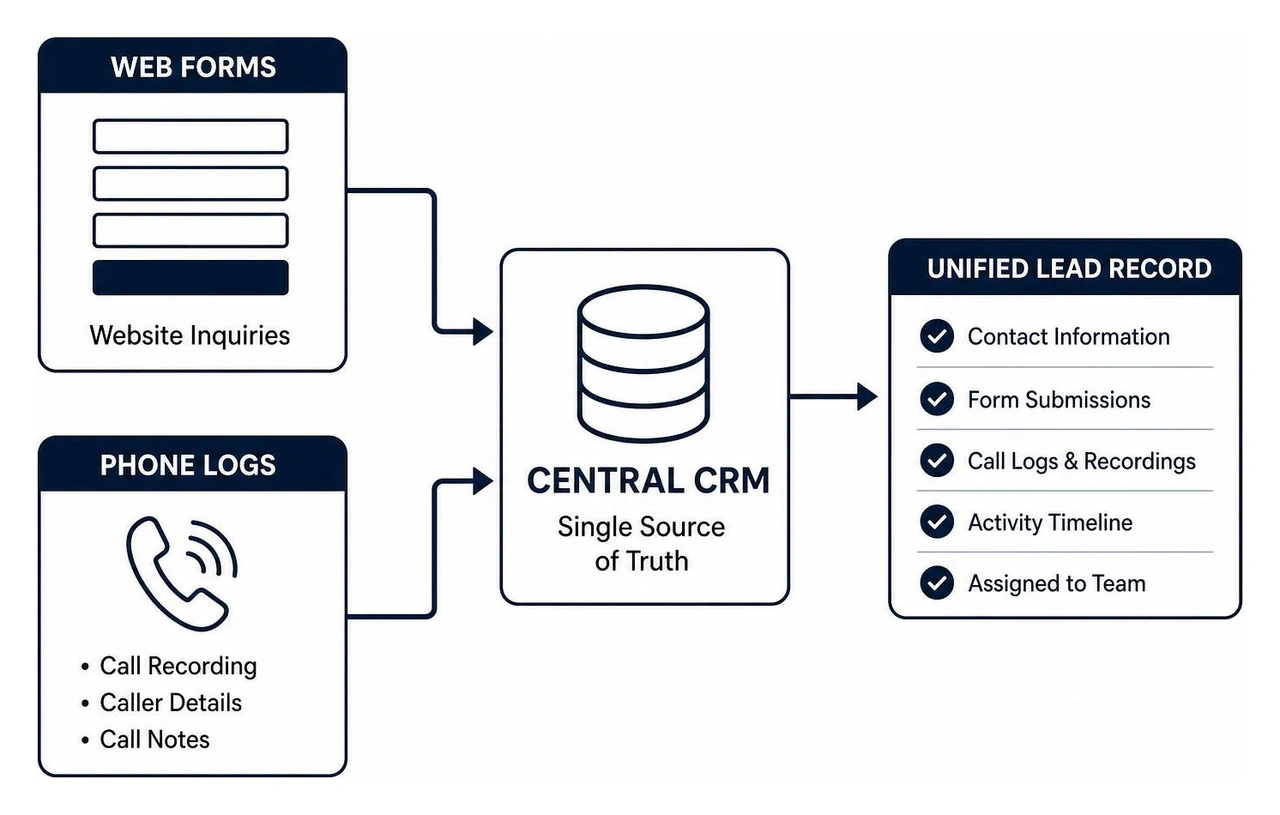
Connecting disparate channels into a clean stream requires mapping your data intake sources to unified record fields. Every inquiry, regardless of origin, must populate four core parameters: contact details, intake channel, time received, and current stage.

Capturing Web Inquiries, Booking Forms, and Chat Inbound
Web forms and booking widgets should route submissions directly into your central dashboard using real-time webhook endpoints. Rather than relying on standard email notifications—which are easily overlooked—modern forms feed structured data directly into your pipeline. According to data management standards in the Meta Business Help Center, direct webhook integrations minimize data loss and ensure customer privacy compliance during transmission.
Each web record receives an automated tag identifying the referring channel, landing page URL, and submission timestamp.
Tracking Inbound Phone Calls and Missed Call Data
Phone calls require automated logging tools such as dynamic number tracking and intelligent call recording. When your staff is on a job site or handling an estimate, capturing the caller's details instantly prevents lost business. Tracking caller history also aligns with performance analysis recommendations from Google Business Profile Help, helping business owners verify which campaigns generate genuine customer calls.
For companies handling high call volumes throughout Central Virginia, setting up an AI receptionist setup ensures that every caller is greeted, qualified, and logged immediately.
How Does Pipeline Visualization Accelerate Inbound Response Times?
Visualizing your sales pipeline replaces guesswork with clear, sequential stages. A visual board lets your team track prospects from contact to job completion, ensuring no prospective customer slips through administrative cracks.
For many Central Virginia service businesses, seeing every inquiry in one place without digging through texts, voicemails, and inboxes immediately surfaces leads that quietly went cold.
Key Features of an Automated Lead Tracking Dashboard
An effective dashboard system relies on several core capabilities:
- Kanban Pipeline Views: Visual cards organized into custom stages (New, Contacted, Qualified, Quoted, Won, Lost).
- Consolidated Activity Timelines: A chronological history of call logs, SMS exchanges, and notes tied to the customer.
- Automated Routing & Assignment: Rules that delegate inquiries to specific team members by service type.
- Visual Urgency Indicators: Badges highlighting leads waiting more than fifteen minutes without a response.
- Custom Field Filtering: Sorting prospects by service category, job size, or neighborhood location.
Establishing Lead Scoring and Multi-Stage Follow-Up Cadence
Simple lead grading helps your team prioritize high-intent requests. Grade prospects on criteria like project size, timeline, and location within Albemarle County.
Pair these criteria with automated reminders so your team maintains consistent follow-up until a job is scheduled or closed. Systematizing this cadence prevents quotes from going cold and provides data on how long prospects take to decide.
How Can Service Businesses Overcome Data Silos Without a Dedicated Tech Team?
Small businesses do not need software engineers to run a reliable tracking setup. You can evaluate your operational maturity using our local business growth scorecard to pinpoint data disconnects.
Eliminating Duplicate Records and Discrepancies
Data discrepancies occur when ad platforms and phone logs use conflicting conversion definitions. A single call might trigger separate events in Google Ads, Meta, and your phone logs. Adhering to verified communication standards from the Federal Communications Commission ensures authentic caller identification and reduces spam entries.
Establish your dashboard as the single source of truth by deduplicating records using primary customer identifiers: phone numbers and email addresses.
Connecting Workflow Automations to Daily Sales Routines
Modern workflow automation systems bridge the gap between receiving an inquiry and taking action. When an inquiry arrives, automated workflows can instantly:
- Dispatch an internal SMS alert to the on-duty technician.
- Send an immediate text acknowledgment to the prospect.
- Share calendar booking links for automated estimate scheduling.
- Tag the lead for weekly status reviews.
These integrations run on existing form builders, phone tools, and automation platforms affordable for small businesses. You simply set your rules once so they operate in the background every day, catching inquiries whether they come in during business hours or late on a Friday evening.
For many owners across Charlottesville, Crozet, and the surrounding counties, this is the piece that finally closes the loop between marketing spend and booked jobs. Once calls and forms land in the same place, it becomes much easier to see which channel is actually paying off, and which ones need attention before another dollar gets spent on ads.
How Can STANDBY Local Help Improve Your Lead Pipeline?
At STANDBY Local, we take a diagnostic approach to local business growth. Before implementing any software or running ad campaigns, we analyze where your operational bottlenecks exist—whether that means missed phone calls, delayed web form follow-ups, or disconnected reporting systems.
We build integrated growth engines combining high-performing websites, local search optimization, AI receptionist services, and workflow automations designed specifically for service businesses across Charlottesville, Crozet, and Central Virginia.
How Do Businesses Track Inbound Leads? Frequently Asked Questions
How quickly should local service businesses follow up with new inbound leads?
Service businesses should respond to new inquiries within five minutes. Prospects often contact multiple providers at once, and the first business to engage professionally and offer an appointment consistently secures the job.
What is the difference between simple lead logging and automated lead management?
Simple lead logging merely records contact details in a static list or spreadsheet, requiring manual data entry and manual follow-up reminders. Automated lead management captures records in real time, organizes them visually, notifies staff immediately, and tracks response times automatically.
How can a business reconcile leads from ads versus organic search?
Reconciling leads requires tracking sources through dynamic call tracking numbers and website UTM parameters. When a customer calls or submits a form, the tracking system logs the specific campaign, keyword, or organic channel that drove the visit, attributing the inquiry accurately.
To identify bottlenecks in your customer intake and build a clean lead system, schedule a free 15-minute consultation with our team.