
Manage Multiple Google Business Profiles from One Place
Google's Business Profile Locations Manager is where you can organize multiple contractor listings under one account. Sign in with the Google Account that owns your profiles, then check each location's access, verification status, hours, contact details, and service area. While single listings can be edited directly in Google Search or Maps, the locations dashboard is the primary tool for managing multiple regional branches.
Find the bottleneck first. An unverified listing, an old phone number, or a duplicate profile needs attention before another post or photo.
I'm Drew Edmondson, founder of STANDBY Local and owner of a Charlottesville wellness center where I test our local marketing systems. When local trade contractors ask how to streamline multi-location management, I start with access and accuracy so they can get back to serving customers.

What Is the Modern Business Profile Manager Dashboard?
When managing multiple service hubs across Central Virginia, understanding where your listings live is critical. Google transitioned away from the standalone Google My Business application to simplify single-listing edits directly within Google Search and Google Maps. For businesses with several locations or regional territories, the centralized back-end dashboard remains the primary control center.
You can set up or manage your listings directly through Get Listed on Google - Google Business Profile US. For a single physical shop, searching for your brand name while logged in lets you update operational details on the fly.
When you operate distinct branches across Albemarle County, Waynesboro, or Harrisonburg, relying solely on Search prompts causes missed reviews and mismatched hours. When I open my business profile manager to check multi-location accounts, having every verified location on a unified screen eliminates the friction of jumping between disconnected logins.
How Does Profile Manager Access Work for Teams?
Sharing a master Google password with administrative assistants, dispatchers, or field leads introduces serious security risks. Google solves this by allowing profile owners to invite users under distinct roles without exposing account credentials.
There are two primary access levels available within the interface:
- Primary Owners and Owners: Retain full administrative authority, including the ability to edit listing details, add or remove other users, and transfer primary ownership.
- Managers: Can edit business hours, update service descriptions, publish posts, and reply to client reviews, but cannot remove users or delete listings.
Google enforces a strict seven-day waiting period for newly added managers and owners. During these first seven days, new managers cannot delete the profile, remove existing owners, or transfer primary ownership. This safeguard prevents compromised accounts from instantly taking over your local listings.
Accessing the Location Dashboard at Scale
To access your complete listing portfolio, navigate directly to the Google Business Profile Locations Manager. This centralized table view displays location names, store codes, verification statuses, and pending customer actions across all your properties.
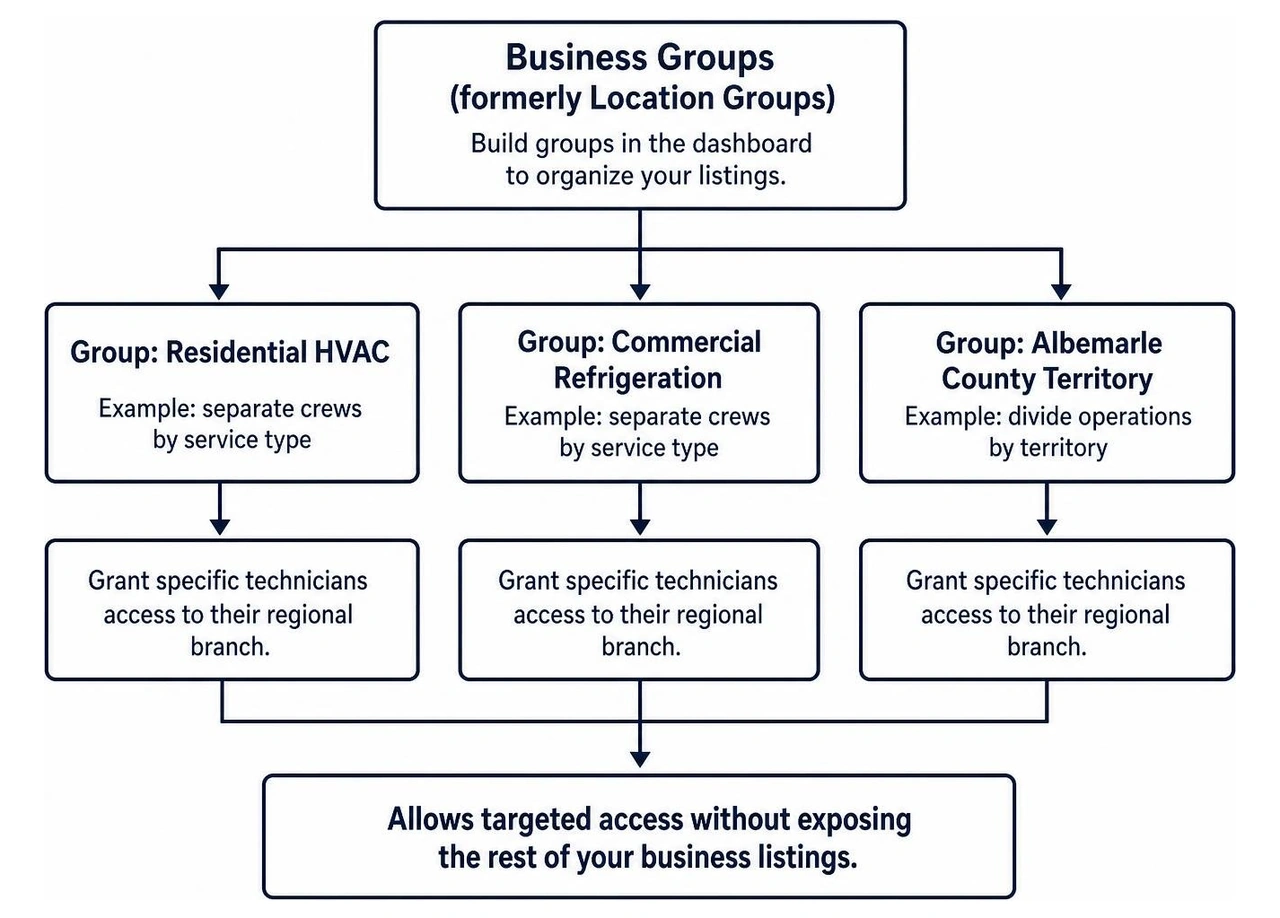
Within this dashboard, you can build Business Groups (formerly known as Location Groups). If your trade business operates separate crews for residential HVAC and commercial refrigeration, or if you divide operations by territory, you can organize your listings into distinct folders. This allows you to grant specific technicians access to their regional branch without exposing the rest of your business listings.
How Do You Set Up, Verify, and Fix Ownership for Multiple Listings?
Contractors expanding into new territories often inherit listing errors, such as former employees claiming an address or an auto-generated listing confusing local search engines.
Before spending time publishing updates, audit every branch. If an old listing exists that you cannot access, follow the official process for regaining access to unowned profiles through an ownership request. The current account holder receives a seven-day window to respond before Google allows you to prove ownership directly.
Once ownership pathways are clear, focus on completing profile verification for every location. Google commonly requires short video verifications for trade contractors to prove real-world operations.
For large trade enterprises operating 10 or more physical locations under the exact same business name, Google provides bulk chain verification. Qualifying businesses must use an email address sharing their official branded website domain to submit their master spreadsheet for review.
Avoiding Multi-Listing Suspensions and Duplicate Penalties
Google requires every listing to represent a genuine, distinct commercial operation with dedicated staff or defined service boundaries. Creating duplicate listings for the same trade business at a single physical address violates platform guidelines and triggers immediate suspensions.
If you operate multiple distinct trades from one commercial office, ensure you review our guide on managing two profiles for one business entity to prevent mutual listing suspensions. When accidental duplicates occur, use the dashboard's merge function or reach out to support to combine review counts and consolidate ranking signals into one verified asset.
How Should You Optimize and Maintain Each Profile Weekly?
Maintaining local search authority across multiple service locations does not require hours of daily administrative work. It requires consistent weekly habits.
Establish a predictable 15-minute weekly checklist across all your active branch profiles:
- Respond to Customer Reviews: Acknowledge both positive and critical feedback within 48 hours to demonstrate active customer care.
- Upload Real Project Visuals: Keep your presence active by uploading authentic job photos of completed local projects rather than generic stock photography.
- Publish Weekly Announcements: Drive engagement by publishing weekly profile updates detailing recent seasonal services or community projects.
- Confirm Upcoming Hours: Check for upcoming holidays to prevent customer frustration from outdated scheduling details.
| Feature | Single Profile (Direct Search / Maps) | Multi-Location Dashboard |
|---|---|---|
| Primary Use Case | Quick day-to-day edits for 1 location | Centralized oversight for 2+ locations |
| User Role Management | Managed one profile at a time | Group permissions across multiple sites |
| Bulk Verification | Not available | Supported for 10+ identical locations |
| Status Overview | Single listing status view | Centralized verification table across all sites |
| Bulk Data Updates | Manual entry only | Spreadsheet import and export support |
How Can Contractors Align Their Business Entity and D-U-N-S Records?
Search engines validate local business legitimacy by cross-referencing public entity registries and commercial credit databases. When your trade business details vary across legal filings, commercial credit profiles, and local search listings, search engines struggle to confirm your business identity.
In Central Virginia, verify that your legal filings match official standards such as the Albemarle County Existing Business Guidelines. Maintaining consistent naming conventions across local registries, state filings, and tax records builds a solid foundation for your digital listings.

At the commercial level, maintain your entity record via the About the D‑U‑N‑S Profile Manager. Dun & Bradstreet maintains credit files referenced by major enterprise platforms and search infrastructure to verify corporate legitimacy. Ensuring your legal name, physical address, and officer structure match across these registries protects your profiles against identity flags and verification delays.
When Should Contractors Update Profile and D-U-N-S Records?
Keep your records synchronized by scheduling an operational audit under the following circumstances:
- Commercial Relocations: Moving your fabrication shop or physical dispatch yard to a new facility.
- Legal Entity Adjustments: Shifting from a sole proprietorship to an LLC or filing a new trade name (DBA).
- Ownership or Partner Transfers: Reallocating equity among managing partners or bringing on regional operators.
- Annual Operational Reviews: Running a baseline check every 12 months to catch outdated phone numbers, suite numbers, or service descriptions.
Frequently Asked Questions About Google Business Profile Management
Can I have multiple Google Business Profiles for the same business?
Yes, as long as each profile represents a legitimate, physically distinct location or a clearly defined, non-overlapping service area. Operating duplicate listings for the same trade services at the exact same physical address violates platform guidelines and can result in listing suspensions.
What is the 7-day waiting period for new profile managers?
Google places a security restriction on newly added owners and managers for their first seven days on the profile. During this window, new users cannot delete the profile, remove existing owners, or transfer primary ownership, protecting businesses from hostile listing takeovers.
How many locations qualify for bulk verification in Google Business Profile?
A business must operate at least 10 distinct physical locations under the exact same business name and industry category to qualify for bulk chain verification. Requests must be submitted using a corporate email address hosted on the business's official website domain.
Conclusion
Managing multiple contractor listings across Central Virginia requires identifying operational bottlenecks early. Fixing access issues, verifying addresses, and organizing your listings into regional business groups prevents suspensions and builds local search credibility.
At STANDBY Local, we help trade and service businesses build reliable, accountable growth systems without empty ranking promises. If your local listings are unverified, scattered across old logins, or draining your team's time, book a free 15-minute consultation or call us at (434) 872-1893 to diagnose your listing setup and put a clear maintenance system in place.