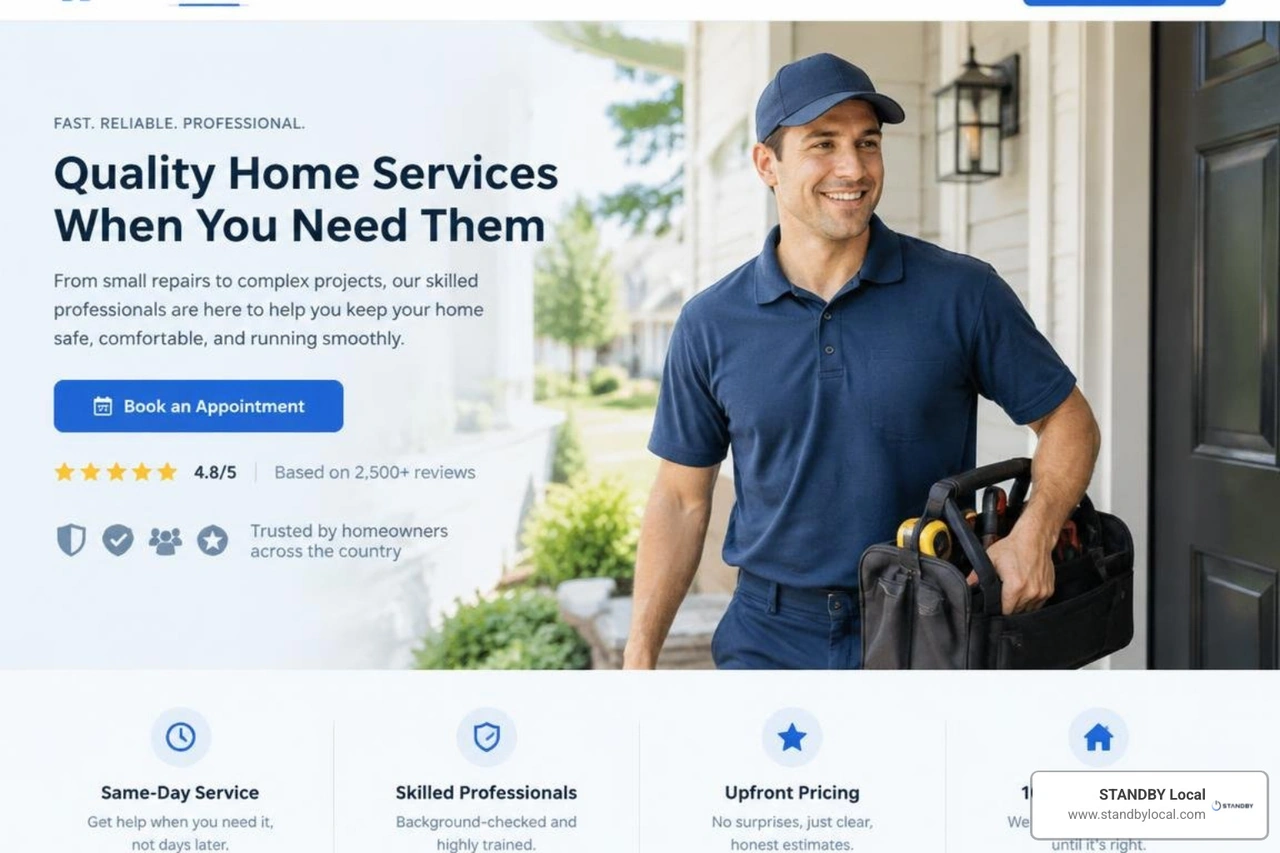
Core Anatomy of a High-Converting Service Business Website
A high-converting website is not an art project; it is a conversion engine engineered to remove friction between a prospective client’s problem and your schedule. When someone lands on your site—whether they need urgent physical therapy in Charlottesville or specialized home care in Albemarle County—they arrive with high intent and low patience. If they cannot determine what you do, where you do it, and how to get on your calendar within five seconds, they will bounce back to search results.
Every high-performing site relies on a structured visual hierarchy that prioritizes essential information above the fold:
- Outcome-Driven Value Proposition: State the exact benefit you deliver, the specific audience you serve, and your primary location. Rather than a vague greeting like "Welcome to Our Practice," use explicit messaging: "Evidence-Based Physical Therapy in Charlottesville to Get You Moving Pain-Free."
- Direct, High-Contrast Calls-to-Action (CTAs): Your primary action button (e.g., "Schedule Your Assessment") should use a contrasting color that stands out from your brand palette. Keep it visible in both the header navigation and the hero section.
- Embedded Trust Signals: Place verifiable credentials right where decisions happen. Add your aggregate rating (e.g., "4.9 Stars Across 180+ Local Reviews"), board certifications, and licensing details directly beneath the main headline.
- Multi-Channel Entry Points: Provide options for varied user preferences. While younger demographics often prefer self-serve online scheduling, others want to speak directly with an office manager. Include a prominent, tap-to-call phone number alongside your direct booking link.
Building an architecture that turns casual visitors into booked clients requires aligning design with user psychology. Implementing focused lead generation website design services ensures every layout element directly supports user decision-making. We also recommend embedding local community authority by referencing established regional connections, such as municipal initiatives found through Town of Scottsville community resources for practices serving southern Albemarle and Fluvanna counties.
Essential Booking and Payment Workflows for Every Service Business Website
A broken or clunky booking flow costs local practices thousands of dollars in unrealized revenue every month. When booking an appointment feels like filling out a tax return, prospective patients abandon the process halfway through.
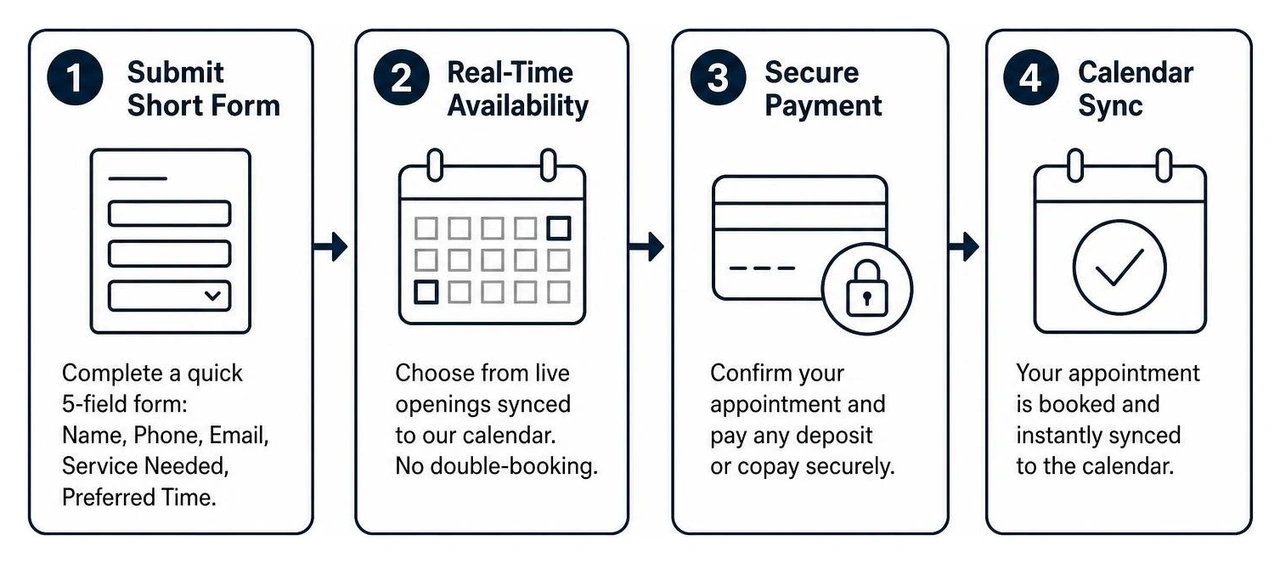
To build a seamless booking workflow:
- Eliminate Unnecessary Form Fields: Keep initial intake forms under five fields. Request only what you need to hold the slot: Full Name, Phone Number, Email, Service Needed, and Preferred Time.
- Enable Real-Time Calendar Sync: Connect your scheduling engine (such as Acuity, Calendly, or your electronic health record/practice management software) directly to your live availability. This avoids double-booking and eliminates the tedious "back-and-forth phone tag" that frustrates clients.
- Collect Deposits Upfront: If your business model requires commitment fees or co-pays, integrate secure payment processors like Stripe or Square directly into the scheduling confirmation screen. This single step dramatically cuts down on no-shows.
- Implement Immediate SMS & Email Confirmations: As soon as an appointment is booked, send an instant text confirmation with calendar invite files and clear parking or preparation instructions.
Before launching any new intake form, run through our rigorous website lead form quality assurance checklist on both desktop and mobile to ensure no inquiries fall through the cracks.
Trust-Building Elements: Reviews, Credentials, and Compliance
In service-based industries—particularly health, wellness, and specialized care—trust is the primary currency. Prospective clients are not just buying a widget; they are trusting you with their health, mobility, or family members.
To establish immediate credibility, distribute proof points throughout the user journey rather than isolating them on a single "Testimonials" page:
- Contextual Social Proof: Place specific patient or client reviews directly next to the corresponding service descriptions. If you offer pediatric chiropractic care, place a review from a local parent on that specific treatment page.
- Verifiable Certifications and Badges: Display relevant professional credentials prominently, whether that means state medical board licenses, IICRC certifications for restoration work, or specific postgraduate clinical accreditations.
- Video Testimonials: Short, authentic 30-second clips of real clients sharing their recovery or service experience build emotional resonance faster than written quotes.
- Regulatory and Compliance Notices: For healthcare, wellness, and care facilities, clearly state HIPAA-compliant data handling practices to reassure patients that their private health information is secure.
Choosing the Right Website Platform for Your Practice or Firm
Selecting a content management system (CMS) is a foundational operational decision. The right platform should match your internal team's technical comfort level while providing the speed, security, and integration capabilities necessary to scale.
When evaluating your options, review our small business website cost guide to understand the total cost of ownership across hosting, maintenance, plugin licenses, and security updates.
| Platform | Best For | Booking & Integration Flexibility | Maintenance Overhead | Customization Limit |
|---|---|---|---|---|
| WordPress | Growing practices needing full data ownership & deep custom CRM routing | High (via native plugins or custom API hooks) | Moderate to High (requires regular updates) | Virtually Unlimited |
| Webflow | High-end visual branding with clean code & built-in CMS collections | Moderate (requires third-party embeds like Acuity/Calendly) | Very Low (managed hosting infrastructure) | High (visual code editor) |
| Squarespace | Solo practitioners & boutique consultancies needing an all-in-one setup | Native (built-in Acuity Scheduling integration) | Low (all-inclusive platform) | Moderate (template constraints) |
| Wix | Quick-launch local service providers on a tight timeline | Native (Wix Bookings app ecosystem) | Low (fully hosted) | Moderate (constrained code access) |
Evaluating Technical Capabilities for a Modern Service Business Website
A visually appealing website will fail to generate appointments if it takes eight seconds to load on a mobile device or breaks when communicating with your CRM.
Search engines evaluate Core Web Vitals—including Largest Contentful Paint (LCP), Interaction to Next Paint (INP), and Cumulative Layout Shift (CLS)—to assess user experience. Slow load times directly degrade conversion rates; even a one-second delay can cause potential patients to abandon their booking attempt.
Investing in disciplined website speed optimization strategies ensures that image assets are compressed into modern formats (like WebP), JavaScript payloads are minimized, and server response times stay under 200 milliseconds. Furthermore, your website must integrate with external automation systems—such as your CRM, automated SMS follow-up tools, or an AI receptionist—via webhooks to handle incoming calls and missed leads instantly.
Accessibility, Privacy, and Local SEO Infrastructure
Building a website for a local care practice or professional service firm requires meeting strict accessibility and local search standards.
- Web Content Accessibility Guidelines (WCAG): Ensure your site complies with ADA standards by using minimum color contrast ratios (4.5:1 for normal text), descriptive image alt attributes, keyboard-navigable menus, and proper aria-labels on interactive booking modules. Learn more about implementing accessible conversion design practices across your entire digital footprint.
- Local Structured Schema Markup: Implement
LocalBusiness,MedicalBusiness, orProfessionalServiceschema markup in your site's code. This provides search engines with explicit data regarding your physical address, operating hours, accepted insurance or payment methods, geo-coordinates, and service radius. - Localized Service-Area Taxonomy: Structure your practice's subpages to reflect both your core offerings and the specific communities you serve across Central Virginia. For example, local practices operating in Albemarle County can align their structural documentation with official guidelines outlined in Albemarle County commercial licensing and business resources.
Designing Decision-Focused Navigation and Persona Pathways
Visitors arrive at your website with different intent levels, backgrounds, and specific concerns. A prospective client experiencing acute back pain has very different immediate needs than a healthcare administrator evaluating a long-term wellness partnership.

To accommodate multiple personas without cluttering your interface, employ progressive disclosure:
- Streamlined Primary Navigation: Limit your top-level menu to five or six essential items: Services, About, New Patients / How It Works, Pricing / Insurance, Blog, and Contact.
- Dropdown Categorization by Need or Persona: Group complex service menus by patient condition or outcome rather than internal clinical jargon. Instead of listing obscure treatment names, group them under intuitive categories like "Spine & Neck Relief" or "Sports Rehabilitation."
- Dedicated Persona Landing Pages: If your practice serves distinct audiences—such as private self-pay patients versus corporate wellness accounts—create separate, targeted landing pages with bespoke messaging, distinct FAQs, and custom intake forms.
Integrating clear website copywriting principles for regional practices helps clarify complex procedures into scannable, outcome-focused language that guides visitors effortlessly down your conversion funnel.
Microinteractions and Visual Hierarchy to Reduce Decision Fatigue
Microinteractions are subtle design details and animations that provide immediate visual feedback to the user, reinforcing clarity and engagement:
- Form Field Confirmation: Display green checkmarks as users correctly enter their phone number or email address, signaling that their input is valid before they hit submit.
- Hover and Active States: Ensure buttons change depth, color, or contrast when hovered over or tapped, confirming clickability on touchscreens.
- Interactive FAQ accordions: Use expandable accordion modules for secondary details (such as insurance coverage or what to wear to an initial visit). This prevents endless page scrolling while keeping critical answers accessible.
- Step-by-Step Multi-Step Forms: For in-depth patient intakes, break the form into a progress bar with 2–3 logical steps. Showing a user they are "Step 1 of 3: Select Your Service" significantly reduces abandonment compared to presenting a massive wall of fields all at once.
Balancing Brand Personality with Clinical and Professional Credibility
Professional service practices often struggle to find the middle ground between looking like an unapproachable corporate institution and an amateur local provider.
To achieve a balanced, credible digital presence:
- Use Authentic, Professional Local Photography: Replace sterile stock photos of models in lab coats with genuine, high-resolution photography of your actual clinic, treatment rooms, and staff members. Authentic images foster familiarity before the client ever walks through your front door.
- Maintain a Restrained Color Palette: Limit your brand palette to two primary tones (e.g., deep slate and medical blue) with a single, vibrant accent color reserved strictly for conversion buttons and key highlights.
- Adopt an Empathetic, Direct Voice: Write copy that speaks directly to the patient's lived experience. Acknowledge their frustrations, outline your treatment philosophy in simple language, and provide clear expectations for their first visit.
Common Pitfalls That Drain Appointments (And How to Fix Them)
Through our diagnostic audits of local service and healthcare practices across Central Virginia, we frequently uncover technical and strategic bottlenecks that silently suppress bookings:
- Burying the Direct Phone Number: Forcing a mobile visitor to dig through three subpages just to find an office phone number causes immediate drop-offs. Keep a tap-to-call icon permanently pinned in the mobile navigation bar.
- Relying on Generic "Contact Us" Forms: Open-ended message boxes with no guidance lead to vague inquiries that take hours of administrative staff time to qualify. Replace them with structured booking widgets or dropdowns that capture the specific condition or service requested.
- Ignoring Mobile Load Speed: Over 65% of local service searches happen on mobile devices. If uncompressed clinic photos cause your site to lag on cellular data connections in Crozet, Waynesboro, or Ruckersville, users will leave for a competitor whose site loads instantly.
- Fragmented Follow-Up Systems: Capturing a form submission is only half the battle. If your front desk takes 24 hours to return an inquiry, that prospective client has likely already booked with another practice. Connect your website forms to automated SMS confirmations and an AI receptionist system to handle after-hours inquiries immediately.
If your existing site is suffering from these legacy bottlenecks, consulting our comprehensive website redesign planning guide will help you map out a rebuild that prioritizes patient acquisition and operational efficiency.
Frequently Asked Questions About Service Business Websites
How often should a local service business refresh its website?
A service business website should undergo a structural and strategic conversion audit every 12 to 18 months, with a complete visual and technological refresh every 2 to 3 years. Over time, search engine algorithms shift, third-party plugin integrations decay, and patient booking expectations evolve. Regular iterative testing—such as tweaking headline copy, refreshing staff photography, and refining appointment intake workflows—ensures your conversion rates stay resilient against local competitors.
What booking software integrations work best for appointment-based practices?
The ideal scheduling integration depends on your regulatory environment and operational model:
- For Clinical & Healthcare Practices (HIPAA-Compliant): Platforms like Jane App, IntakeQ, NexHealth, or Kareo provide secure, compliant booking workflows with integrated patient charting and intake documentation.
- For General Professional Services & Wellness Clinics: Tools such as Acuity Scheduling, Calendly, or Square Appointments offer robust real-time calendar syncing, automated SMS/email reminders, and seamless Stripe payment gateway processing.
Can a service website convert visitors without displaying public pricing?
Yes, but transparency always converts better than complete ambiguity. If your treatments or services vary widely based on individual diagnostics, use price anchoring or "Starting At" baseline ranges (e.g., "Initial Comprehensive Evaluation starting at $150").
If public pricing is not feasible due to complex insurance billing, clearly explain how costs are determined and offer a low-friction "Verify Your Insurance" or "Request a Treatment Estimate" pathway to eliminate financial hesitation early in the decision process.
Conclusion
Your website is the digital front door to your practice or firm. When engineered with clear visual hierarchy, frictionless scheduling integrations, and verifiable local trust signals, it transforms from a static marketing brochure into an automated engine that consistently books qualified appointments.
At STANDBY Local, we partner with practice owners, clinical directors, and service leaders throughout Charlottesville, Albemarle County, and Central Virginia to eliminate operational bottlenecks and build resilient client acquisition systems.
If you are ready to stop losing high-intent leads to fragmented workflows and outdated digital infrastructure, partner with our team for comprehensive small business website redesign services.
Schedule your free growth blueprint call today by reaching out to hello@standbylocal.com. Let's build a digital platform that works as hard as you do.